











EDI API Integration

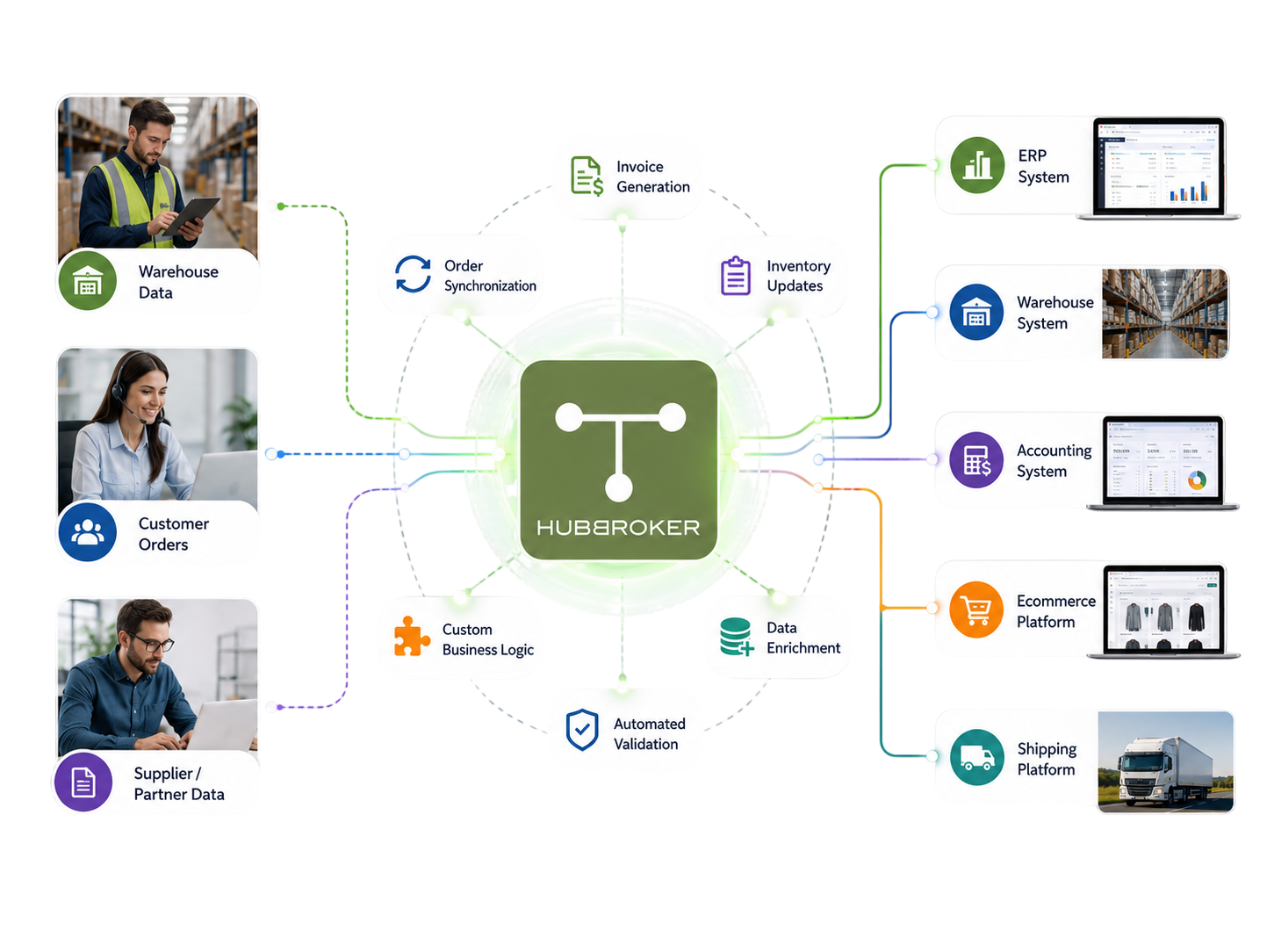
HubBroker's ERP API Integration connects your ERP system to apps, marketplaces, portals, and partner platforms through stable APIs, so business data moves between tools without manual exports or imports.

API integration-Photoroom_removal bg.png
Titgemeyer.png
wexe_a_logo.svg.png
ABc.png
Ammega.svg
Atea.png
Frame_1000009461.png
fujitsu_logo.svg
langkilde__Son.png
Nature_Source.png
orkla_logo.svg
Proshop.png

Simplifying ERP API Integrations with HubBroker

The Challenges Businesses Face

Manual File Exchange

Manual exports and imports between ERP and other tools

Disconnected Business Apps

ERP, CRM, eCommerce, and portals running in isolation

Custom Integration Build

One-off code builds for each new app or marketplace

Inconsistent Cross-System Data

ERP and connected apps drifting out of sync

Limited Cross-System Visibility

No central log of API calls, errors, or exceptions.

How HubBroker Solves It

Direct API Connectivity

Stable API links between ERP and your business apps

One Platform, Many Apps

ERP, marketplaces, portals, and CRM in one setup

Reusable Integration Patterns

Pre-built API templates speed up new connections

Real-Time Data Sync

Data flows between ERP and apps in near real time

Central Logging and Audit

One log of every API call, error, and exception

Want To See How HubBroker Simplifies Integrations?

Let's schedule a demo and discover how our integration platform connects your apps and automates processes.

Delivering Impact Across The World

15+

Years Experience

500+

Projects Delivered

2000+

Global Clients

40+

Countries

HubBroker ERP API Integration Process

1

Requirement Review

We review your ERP system, the apps and platforms you want connected, the data flows in scope, and the user roles involved so the API integration is shaped around your real business needs.

2

API Availability Check

We confirm what APIs are available on your ERP and the connected apps, including endpoints, scopes, rate limits, and authentication methods, so the design works within real platform constraints.

3

Data Flow Mapping

Each business data flow including orders, invoices, customers, products, and inventory is mapped end to end between your ERP and the connected apps with clear field ownership across systems.

4

Access Setup

API keys, tokens, OAuth permissions, and service accounts are configured for each connected system, so authentication is centralised and managed through HubBroker rather than scattered across tools.

5

API Configuration

API calls are configured to read and write the right data in the right direction at the right frequency, so your ERP and connected apps share information in line with the agreed business rules.

6

Testing and Validation

End-to-end transactions are run between your ERP and each connected app, with validation against business logic, rate limits, and error handling before any flow goes into live production.

7

Go-Live

API integrations are moved into production with a controlled cutover, so existing data exports, imports, and manual interfaces continue to work alongside new flows until everyone is comfortable.

8

Monitoring and Support

Once live, API activity, error rates, and exception handling are monitored, with support for new apps, endpoint changes, and adjustments as platforms update or your business needs evolve.

Secure, Scalable ERP API Integration

Automate the Apps That Matter to You

Key Benefits of ERP API Integrations

Less Manual File Exchange

ERP data moves to and from connected apps and marketplaces through APIs, so finance and operations teams stop running manual exports, file imports, and copy-paste workflows daily.

Faster Cross-System Data Flow

Orders, invoices, customer records, and inventory updates move between your ERP and connected platforms in near real time, helping teams act on accurate, current information faster.

Cleaner Data Across Systems

Validation and field mapping happen at each API call, so the data sitting in your ERP and connected apps stays consistent rather than drifting apart between manual sync cycles each week.

Scalable App Connectivity

Adding a new app, marketplace, or portal becomes a configurable step rather than a custom build, so the integration layer scales as your business adds new tools and growth channels.

Stronger Control and Audit

API calls, errors, and exceptions are logged centrally, so IT, finance, and audit teams share one place to see what data moved when, between which systems, and under whose authorisation.

Foundation for Wider Automation

Your ERP API setup connects naturally to EDI, Peppol e-invoicing, intelligent document processing, and PDF-to-XML in the same HubBroker platform, so automation can grow over time.

Supported Documents

Industries We Empower Together

HubBroker solutions support businesses across industries where reliable data exchange, automation, compliance, and partner connectivity are essential.

Retail and eCommerce

Support fast-moving order, invoice, inventory, and marketplace workflows with automated document and system integrations.

Manufacturing

Help manufacturers connect suppliers, customers, ERP systems, and logistics partners for smoother production and supply chain operations.

Logistics and Transportation

Enable structured data exchange for shipping, delivery, tracking, invoicing, and partner communication across logistics networks.

Healthcare and Pharmaceuticals

Support secure and accurate document exchange where compliance, reliability, and process efficiency are critical.

Finance and Banking

Help financial businesses improve document processing, data accuracy, reporting flows, and secure business communication.

Wholesale and Distribution

Automate order-to-cash and procure-to-pay workflows across customers, suppliers, warehouses, and ERP systems.

Why Businesses Choose HubBroker for ERP API Integration

Built Around Real ERP APIs

Our integration uses the real APIs offered by ERPs like Business Central, SAP B1, Visma e-conomic, and Uniconta, with proper handling of rate limits, scopes, and platform quirks built in.

One Platform, Many Apps

Connect your ERP once to apps, marketplaces, portals, CRMs, eCommerce platforms, and partner systems through the same HubBroker layer, instead of building separate integrations per tool.

EDI, Peppol, and IDP Together

API integration sits alongside EDI, certified Peppol Access, and intelligent document processing in one platform, so structured and unstructured data flows share the same setup.

Repeatable Implementation Path

Our ERP API projects follow a documented path from requirement review through testing and go-live, so IT, finance, and operations teams stay aligned on timeline, scope, and effort.

Practical Support and Maintenance

Our teams in Denmark and India support API customers directly on endpoint changes, error handling, and new app onboarding, so integrations stay healthy as platforms keep evolving.

Strong Visibility and Logging

Every API call, response, and error is logged centrally in HubBroker, so issues are diagnosed and resolved quickly rather than buried inside individual app dashboards or logs.

Frequently Asking Questions

HubBroker integration platform acts as a cloud-based middleware that connects different systems, enabling them to communicate and share data. We provides users with a unified, AI-powered platform with an intuitive user experience. Features include prebuilt connectors and integrations that empower non-technical users, and one-click access to powerful developer tools for technical users to help facilitate data integration and business process automation.

Got Questions? We're Here To Help

+45 25943777 contact@hubbroker.com

Denmark Office

Bredgade 45B, København K, Capital Region , 1260, Denmark

India Office

D-1010, The First, B/H ITC Narmada, Ahmedabad, Gujarat, 380015, India

START GROWING YOUR BUSINESS WITH US

This site is protected by reCAPTCHA and the Google Privacy Policy and Terms of Service apply.