











EDI Integration

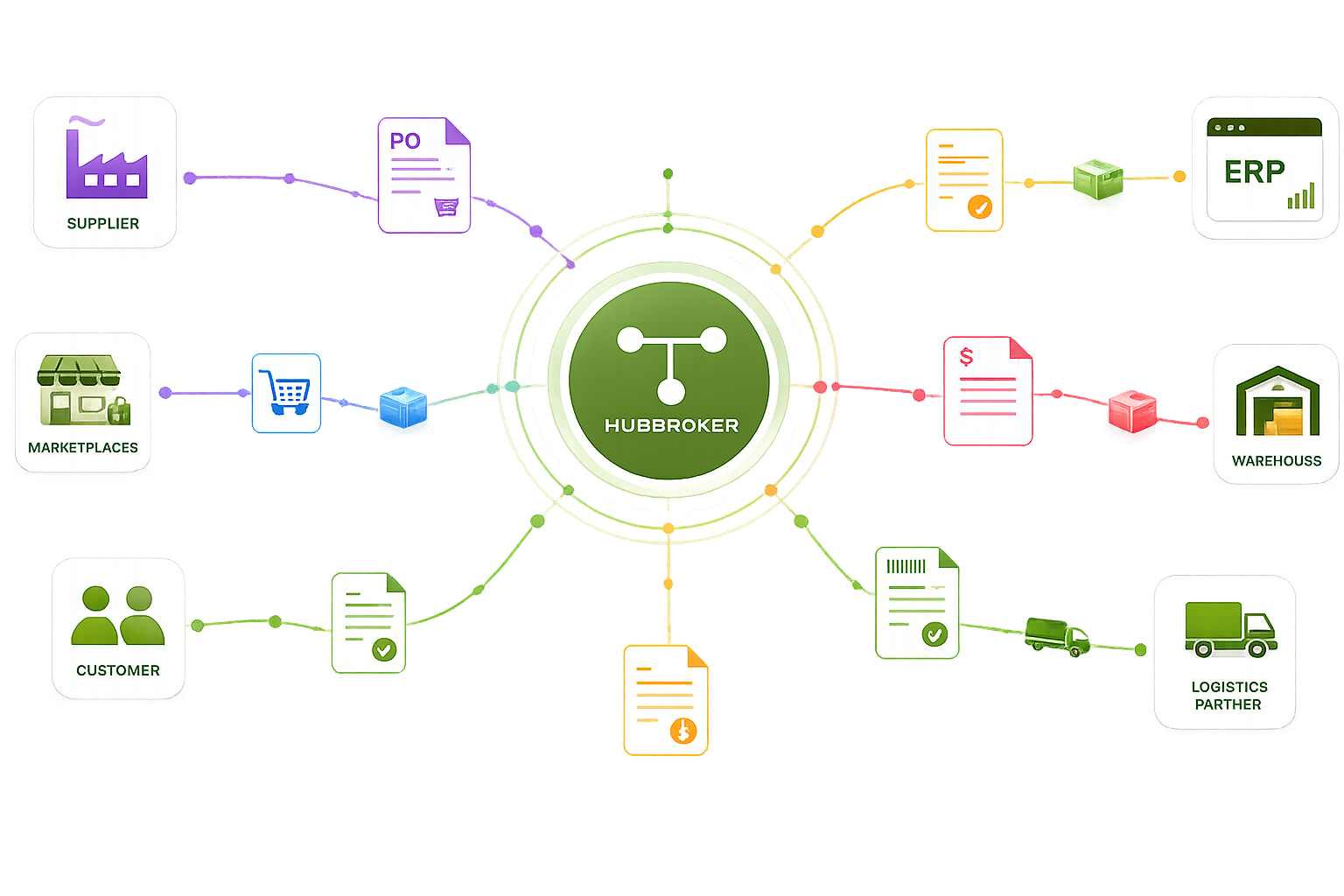
HubBroker's EDI Integration platform automates document exchange with customers, suppliers, retailers, and logistics partners so orders, invoices, and shipping data move automatically.

ChatGPT Image Jun 11, 2026, 07_18_19 PM.png
Titgemeyer.png
wexe_a_logo.svg.png
ABc.png
Ammega.svg
Atea.png
Frame_1000009461.png
fujitsu_logo.svg
langkilde__Son.png
Nature_Source.png
orkla_logo.svg
Proshop.png

Simplifying EDI Integrations with HubBroker

The Challenges Businesses Face

Manual Data Entry

Manual document entry slowing finance and operations teams

Format Mismatches

Format mismatches causing partner rejections and rework

Costly Partner Onboarding

Custom builds for each new trading partner connection

Low Document Visibility

Limited visibility into document flow and exceptions

Compliance Gaps

Compliance gaps for tax, audit, and Peppol requirements

How HubBroker Solves It

Automated Document Exchange

Automated exchange of orders, invoices, and shipping data

Built-In Validation

Built-in validation against format and partner rules

Reusable Partner Profiles

Reusable partner profiles for fast onboarding

Dashboards and Audit Trails

Live dashboards and audit trails for every document

Certified Peppol Access

Certified Peppol Access Point built into the platform

Want To See How HubBroker Simplifies Integrations?

Let's schedule a demo and discover how our integration platform connects your apps and automates processes.

Delivering Impact Across The World

15+

Years Experience

500+

Projects Delivered

2000+

Global Clients

40+

Countries

HubBroker EDI Integration Process

1

Requirement analysis

We start by understanding your trading partners, document types, transaction volumes, and existing systems, so the EDI design is shaped around your real operations rather than a generic template.

2

Partner Analysis

Each customer, supplier, and logistics partner is reviewed for their preferred formats, identifiers, connection methods, and business rules, giving you a single picture of what each connection needs.

3

Document Flow Mapping

Order, invoice, shipping, and other document flows are mapped end to end between your systems and each partner, with clear ownership of fields, transformations, and acceptance criteria for each step.

4

Format Conversion

Documents are converted between your internal structures and partner formats including EDIFACT, X12, XML, JSON, and CSV, so neither side has to adapt its existing systems to meet the other party.

5

System Integration

HubBroker connects to your ERP, WMS, eCommerce, or finance system through standard connectors and APIs, so EDI data lands where your team actually works rather than in a separate inbox or portal

6

Testing and Validation

Sample transactions are exchanged with each partner and validated against format rules, business logic, and live ERP behaviour, so issues are surfaced and resolved before any document hits production.

7

Go-Live

Once tested, EDI flows are moved into production with a controlled cutover plan, so existing order and invoice activity continues without disruption to customers, partners, or internal teams.

8

Monitoring and Support

After go-live, document flow, partner activity, and exceptions are monitored continuously, with support available for new partner onboarding, format changes, and ongoing business adjustments.

Secure, Scalable EDI Integration

Automate the Apps That Matter to You

Key Benefits of EDI Integrations

Less Manual Document Work

Orders, invoices, dispatch notes, and confirmations are exchanged automatically with your customers and suppliers, so your team stops copying, emailing, and rekeying the same data every day.

Faster Order and Invoice Cycles

With documents arriving directly in your ERP or eCommerce system, order confirmation, fulfilment, and invoicing all start sooner, helping your business respond faster to customer and supplier activity.

Full audit trail per invoice in one system

Built-in validation catches missing fields, format issues, and broken values before documents reach a partner or your ERP, reducing rejections, disputes, and downstream cleanup for finance and operations.

Scalable Partner Network

Onboarding new customers, suppliers, retailers, or logistics partners follows a repeatable process with reusable mappings and profiles, so each new connection takes less time than the last.

Compliance and Audit Readiness

Every EDI document is logged with status, validation results, and history, giving finance, IT, and auditors a clear, searchable trail for tax, contractual, and internal control requirements.

One Platform Across Systems

HubBroker connects ERP, WMS, eCommerce, marketplaces, and partner networks through a single platform, so you manage one integration layer instead of maintaining separate point-to-point tools.

Supported Documents

Industries We Empower Together

HubBroker solutions support businesses across industries where reliable data exchange, automation, compliance, and partner connectivity are essential.

Retail and eCommerce

Support fast-moving order, invoice, inventory, and marketplace workflows with automated document and system integrations.

Manufacturing

Help manufacturers connect suppliers, customers, ERP systems, and logistics partners for smoother production and supply chain operations.

Logistics and Transportation

Enable structured data exchange for shipping, delivery, tracking, invoicing, and partner communication across logistics networks.

Healthcare and Pharmaceuticals

Support secure and accurate document exchange where compliance, reliability, and process efficiency are critical.

Finance and Banking

Help financial businesses improve document processing, data accuracy, reporting flows, and secure business communication.

Wholesale and Distribution

Automate order-to-cash and procure-to-pay workflows across customers, suppliers, warehouses, and ERP systems.

Why Businesses Choose HubBroker for EDI Integration

End-to-End EDI in One Platform

Mapping, conversion, partner onboarding, validation, monitoring, and ERP connectivity all live in the same HubBroker platform, instead of being stitched together from multiple separate tools.

Strong ERP and eCommerce Coverage

Pre-built connectors for Business Central, SAP B1, Visma e-conomic, Uniconta, Rackbeat, Shopify, BigCommerce, and others let you go live faster than a custom-built integration usually allows.

Certified Peppol Access Included

EDI customers get certified Peppol Access Point connectivity, so e-invoicing, B2G compliance, and growing EU mandates are handled in the same place as standard customer and supplier exchange.

Built-In Validation and Visibility

Format, field, and business rule validation runs on every document, and dashboards show flow, errors, and partner activity, so problems are caught early instead of surfacing in month-end reports.

Repeatable Implementation Approach

Our EDI projects follow a documented path from requirement review through testing to go-live, so internal stakeholders know what is happening at each stage and timelines stay predictable.

Hands-On Support Across Regions

Teams based in Denmark and India support EDI customers directly on partner onboarding, format changes, and ERP-side issues, giving you a single point of contact rather than vendor handoffs.

Frequently Asking Questions

HubBroker integration platform acts as a cloud-based middleware that connects different systems, enabling them to communicate and share data. We provides users with a unified, AI-powered platform with an intuitive user experience. Features include prebuilt connectors and integrations that empower non-technical users, and one-click access to powerful developer tools for technical users to help facilitate data integration and business process automation.

Got Questions? We're Here To Help

+45 25943777 contact@hubbroker.com

Denmark Office

Bredgade 45B, København K, Capital Region , 1260, Denmark

India Office

D-1010, The First, B/H ITC Narmada, Ahmedabad, Gujarat, 380015, India

START GROWING YOUR BUSINESS WITH US

This site is protected by reCAPTCHA and the Google Privacy Policy and Terms of Service apply.