











PDF to XML EDI Conversion

HubBroker's PDF to XML Invoice Conversion turns supplier invoice PDFs and scanned documents into structured XML data, so AP and AR teams stop rekeying and ERP records stay clean and validated.

document_mapping_transparent.png
Titgemeyer.png
wexe_a_logo.svg.png
ABc.png
Ammega.svg
Atea.png
Frame_1000009461.png
fujitsu_logo.svg
langkilde__Son.png
Nature_Source.png
orkla_logo.svg
Proshop.png

Simplifying Pdf To Xml Invoice Conversion

The Challenges Businesses Face

Manual PDF Invoice Entry

Hours spent rekeying supplier PDFs into ERP each week

Inconsistent Supplier Formats

Varied PDF layouts across many suppliers and regions

Errors in Extracted Data

OCR or manual errors in VAT, totals, and line items

Slow AP Processing Cycles

Delayed approvals and missed discount windows from delays

Limited Audit Trail

Hard to trace PDF, data, and posting back to one record

How HubBroker Solves It

Automated PDF Capture

PDFs from email, scan, or portal captured automatically

AI-Driven Field Extraction

Headers, lines, VAT, and totals extracted from any layout

Clean ERP-Ready XML Output

Structured XML mapped to your ERP format on every invoice

Built-In Data Validation

Checks against supplier, VAT, and PO rules before posting

Searchable Audit Trail

Original PDF, XML, and posting linked to one record

Want To See How HubBroker Simplifies Integrations?

Let's schedule a demo and discover how our integration platform connects your apps and automates processes.

Delivering Impact Across The World

15+

Years Experience

500+

Projects Delivered

2000+

Global Clients

40+

Countries

HubBroker Pdf To Xml Invoice Conversion Process

1

Invoice Source Review

We review the channels invoices arrive through, including supplier emails, attachments, scanned post, and portals, so every PDF type and document source is included in the conversion flow.

2

PDF Data Capture

Each incoming PDF or scanned invoice is captured automatically through your defined channels, so AP staff stop downloading, sorting, and opening individual attachments before processing starts.

3

Field Extraction

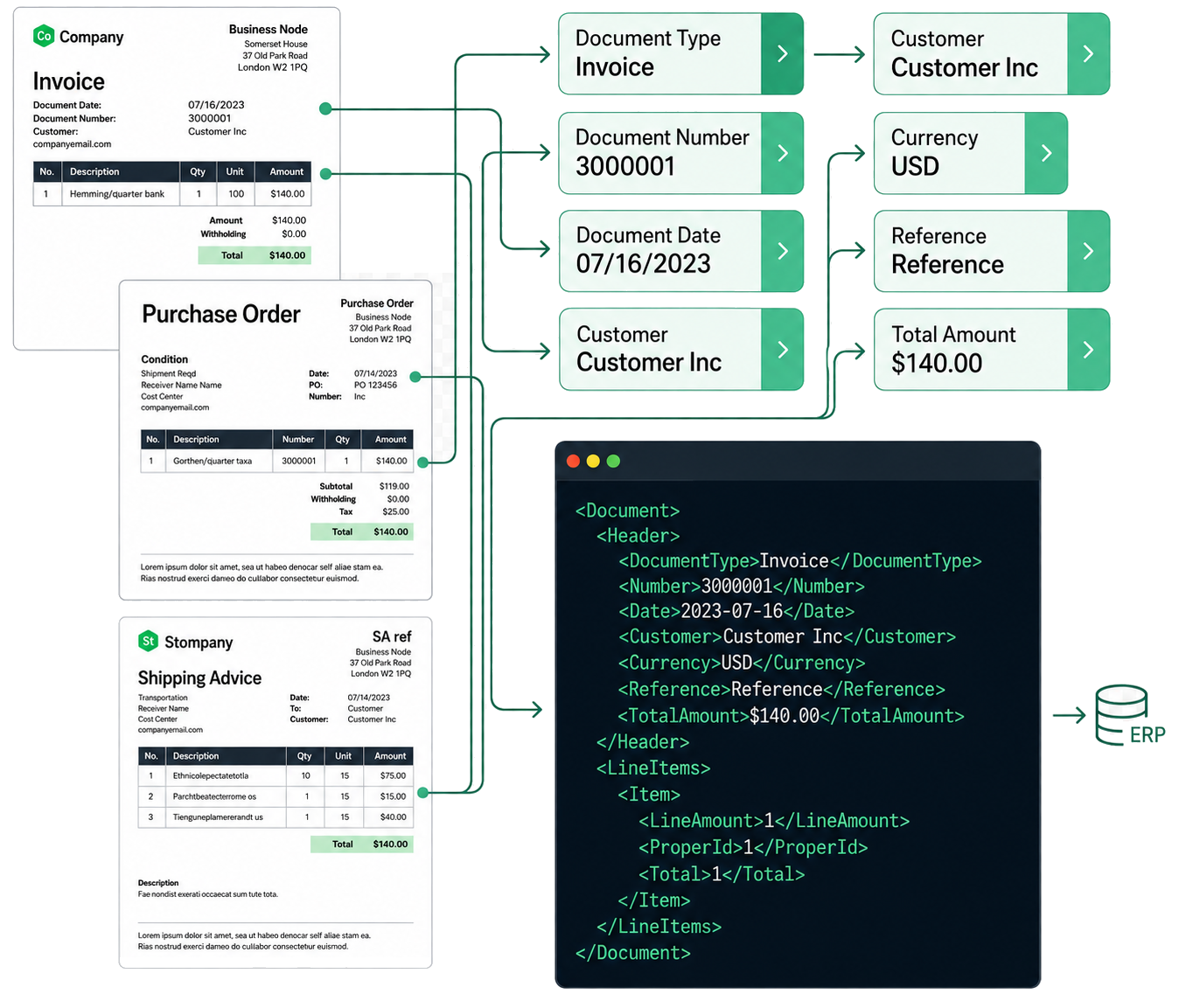
AI models read invoice headers, line items, supplier details, and tax data, turning unstructured PDFs into structured records that can be transformed into clean XML ready for ERP entry.

4

XML Mapping

Extracted invoice data is mapped to the XML structure your ERP, finance system, or downstream tool expects, including field names, hierarchies, and any country or partner-specific layouts.

5

Data Validation

XML data is validated against your supplier master, tax rules, PO references, and business logic, so missing data, mismatches, and likely errors are flagged before any document reaches the ERP.

6

ERP Integration

Validated XML invoices are posted into your ERP through standard workflows for posting, matching, and approval, so the rest of AP behaves as expected without changes to existing finance flow.


7

Exception Handling

Invoices that need human review are routed to AP staff with extracted XML, validation results, and the original PDF side-by-side, so exceptions are resolved quickly rather than being queued.

8

Ongoing Monitoring

Once live, extraction accuracy, conversion rates, exception volumes, and processing times are monitored, with tuning and updates applied as new suppliers and invoice layouts appear over time.

Secure, Scalable EDI Integration

Automate the Apps That Matter to You

Key Benefits of Pdf To Xml Invoice Conversion

Less Manual AP Work

AP teams stop typing supplier invoice data from PDFs and scans, so their time goes into supplier issues, approvals, and exception handling rather than basic data entry tasks every day.

Faster Invoice Turnaround

Invoices arriving through email, post, or portals are converted to XML and processed within minutes, so approval, payment, and supplier discount cycles all start sooner than they typically do.

Higher Data Accuracy

AI extraction combined with rule-based validation reduces typing errors, missing fields, and mismatched VAT or PO data, so your ERP holds cleaner XML records and reporting stays reliable.

Clean ERP-Ready Output

Every PDF is converted into XML formatted exactly the way your ERP or downstream system needs it, so finance teams skip the cleanup that usually follows manual or generic OCR processing.

Clearer Exception Handling

Only invoices that genuinely need a human are surfaced to AP, with extracted XML and the original PDF presented together, so resolution is faster and easier for everyone in the workflow.

Audit and Compliance Ready

Each invoice keeps its original PDF, extracted XML, validation results, and posting history together, giving auditors and finance a clear, searchable trail across your AP process.

Supported Documents

Industries We Empower Together

HubBroker solutions support businesses across industries where reliable data exchange, automation, compliance, and partner connectivity are essential.

Retail and eCommerce

Support fast-moving order, invoice, inventory, and marketplace workflows with automated document and system integrations.

Manufacturing

Help manufacturers connect suppliers, customers, ERP systems, and logistics partners for smoother production and supply chain operations.

Logistics and Transportation

Enable structured data exchange for shipping, delivery, tracking, invoicing, and partner communication across logistics networks.

Healthcare and Pharmaceuticals

Support secure and accurate document exchange where compliance, reliability, and process efficiency are critical.

Finance and Banking

Help financial businesses improve document processing, data accuracy, reporting flows, and secure business communication.

Wholesale and Distribution

Automate order-to-cash and procure-to-pay workflows across customers, suppliers, warehouses, and ERP systems.

Why Finance Teams Choose HubBroker for PDF to XML Conversion

Built for Real Invoice Variety

Our conversion handles the supplier formats, languages, layouts, and quirks that actually arrive in your AP inbox, rather than working only on neat sample invoices in a demo setup.

ERP-Aware XML Output

XML is built around real ERPs like Business Central, SAP B1, Visma e-conomic, and Uniconta, so AP teams keep their familiar tools and workflows while gaining structured invoice data.

AI Plus Business Rules

PDF-to-XML combines AI extraction with your supplier, tax, and PO rules, so the system understands not just the layout of an invoice but how your business actually processes it daily.

Peppol-Ready Path Forward

Where suppliers are Peppol-capable, invoices flow as structured e-invoices through our certified Access Point, so PDF-to-XML works alongside genuine e-invoicing rather than replacing it.

Practical Support and Tuning

Our teams in Denmark and India support tuning, exception review, and new supplier onboarding directly, so conversion accuracy improves as your supplier base and invoice volume change.

Part of a Wider Platform

PDF-to-XML conversion sits alongside EDI, Peppol e-invoicing, ERP API integration, and IDP in the same HubBroker platform, so document automation grows with the business over time.

Frequently Asking Questions

HubBroker integration platform acts as a cloud-based middleware that connects different systems, enabling them to communicate and share data. We provides users with a unified, AI-powered platform with an intuitive user experience. Features include prebuilt connectors and integrations that empower non-technical users, and one-click access to powerful developer tools for technical users to help facilitate data integration and business process automation.

Got Questions? We're Here To Help

+45 25943777 contact@hubbroker.com

Denmark Office

Bredgade 45B, København K, Capital Region , 1260, Denmark

India Office

D-1010, The First, B/H ITC Narmada, Ahmedabad, Gujarat, 380015, India

START GROWING YOUR BUSINESS WITH US

This site is protected by reCAPTCHA and the Google Privacy Policy and Terms of Service apply.